Story Mode
Keep them watching.
Turn long, raw footage into a story with a clear arc. TIONS finds the moments that matter, orders them, and leaves you in charge of the final cut.
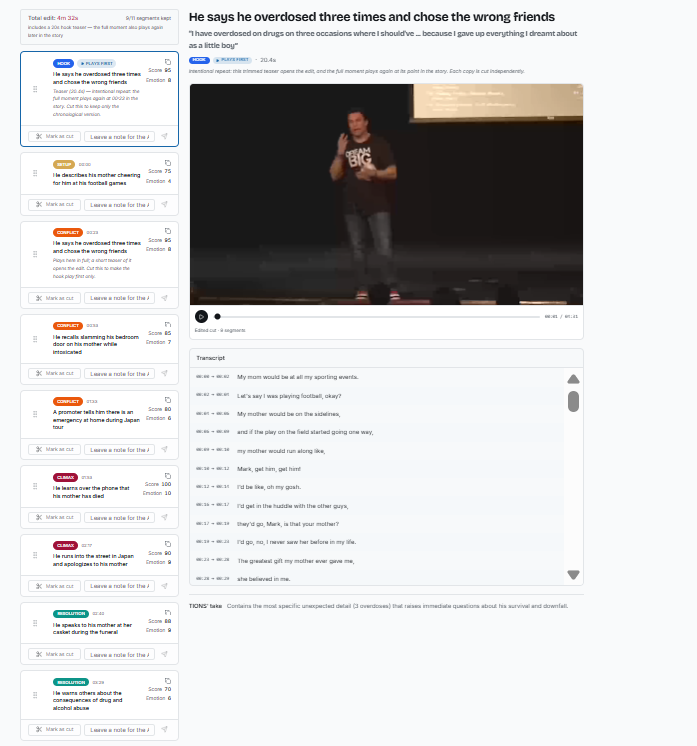
What it's for
Footage where the order of moments decides whether people stay: customer testimonials, interviews, YouTube videos, documentary-style pieces. One long video in, an edit with a beginning, tension and a payoff out.
- HookThe opening moment that earns the next ten seconds.
- SetupWho is speaking and what is at stake.
- ConflictThe problem and the pressure.
- ClimaxThe turning point.
- ResolutionThe payoff.
Features
What you get.
How to use it
Five steps.
- 01Create a project
- 02Upload your video
- 03Set strategy and dials
- 04Review the beats
- 05Render
Capabilities and limits
- 2 videos (lifetime)
- 2 renders per video
- 3 regenerations per video
- Up to 500 MB or about 12 minutes per video
- English footage only
Rendered videos include a TIONS watermark. XML timeline export (for Adobe Premiere Pro) has no watermark. Keep your original footage next to the XML. Footage is processed by third-party services for transcription, analysis and rendering.